Using Autofac in SharePoint 2010
Up till now in my SharePoint 2010 projects, I’ve been using the very nice SharePoint Service Locator(http://spg.codeplex.com) implementation, from the patterns & practices group. This has been really
Up till now in my SharePoint 2010 projects, I’ve been using the very nice SharePoint Service Locator implementation, from the patterns & practices group. This has been really useful, and works great. If you’re not familiar with the service locator pattern, you can read up on it here. Using this pattern, it’s easy to build a lightweight common library that you pass out to your team (or as is often the case “teams”) of developers without them having to mess around with the implementation of every interface. After all, the implementation of the interfaces are registered and deployed on the SharePoint server using a feature, and that’s all developers need to know. In many instances, developers might even develop for SharePoint without even having SharePoint installed. The service locator allows you to build an API that often looks like this in my projects:
- AppContext.Repositories.ContactsRepository.GetContact( … ), UpdateContact( … )
- AppContext.Services.RegisterUser( … ), PurchaseProduct( … ) –> complex step that might work with multiple repositories and talk to AD, and the user profile manager
- AppContext.Data.Call<storedprocedure>( … ) –> allow a direct call to a database, which happens sometimes in a custom service application
Why Autofac?
While Autofac provides service locator functionality with it’s ILifetimeScope and IContainer implementations, it also provides dependency injection of constructor parameters, and properties, and a fluent interface that allows late-bound resolution of injected parameters, and much more. Other containers you could look at are: StructureMap (another favorite of mine), Unity, Ninject, Spring.NET, Castle Windsor. Based on benchmarks though – see here and here – it seems that Autofac is one of the better performing containers. Another thing that is useful about using Autofac is the “InstancePerLifetimeScope()” registration extension that will automatically instantiate the registered type for every ASP.NET request, and properly dispose of the object at the end of the ASP.NET request, which makes it an ideal candidate to minimize round-trip connections to a database for example, or other persistent storage.
Autofac vs. SharePoint Service Locator
Whereas the SharePoint Service Locator stores it’s mapping of interfaces to their implementations as persisted objects in the database, Autofac wires things up in ASP.NET during the Application_Start event. Autofac also requires some additional configuration in the web.config file, so already, Autofac is going to demand a little more of a setup process.
The other core need is to allow developers to wire up additional mappings in any new features they develop, and it would be nice for there not to be a need to always modify the web.config file everytime a new feature with new mappings is developed. So storing mappings in SharePoint might be a good idea.
Wiring Autofac up
The following code is a Farm-scoped Feature EventReceiver that wires up Autofac on all the web front-ends within the farm. The code takes care of registering Autofac and unregistering Autofac. It primarily does 2 things:
- Makes all configuration changes to the web.config file necessary to support Autofac
- Alters the global.asax file on all web front-ends
IISRESET is required after installing the feature
After the event receiver installs Autofac … you’ll see the following summarized list of changes to the root web.config files on all front-end web applications:
You’ll notice that this implementation has the “modules” functionality already wired-up at the very end of the web.config file to add new modules (see here for more details). But this isn’t the only way you can add new modules. In the “Autofac Integration Code” above, I’ve added the ability to store module configuration in SharePoint (using a Farm property) that also gets added to the modules wired up during Application_Start.
The functions that developers can use in their feature event receivers to register (and unregister) Autofac modules into SharePoint are in the SPContainerBuilder class in the download, and have the following signatures:
public static void RegisterModule(string moduleType, IDictionary<string, string> properties, IDictionary<string, string> parameters, bool replaceIfExists){ … } public static void RemoveModule(string moduleType){ … }
Developers integrating new features into SharePoint can leverage these two functions in their feature event receivers to add new Autofac mappings without modifying the web.config files going-forward.
By modifying the global.asax file, Autofac fires during Application startup and calls an initialize method on a static service locator class. The initialization of the Autofac container looks like the following.
Using Autofac within Application Pages, Web Parts, User Controls, Event Receivers
Application pages and user controls can use the standard injection techniques that come with Autofac with ASP.NET (in the Autofac.Integration.Web assembly).
In SharePoint, there are various scenarios that need to be supported. The following is a non-comprehensive list, along with various usages that support each.
Using Autofac on the Server
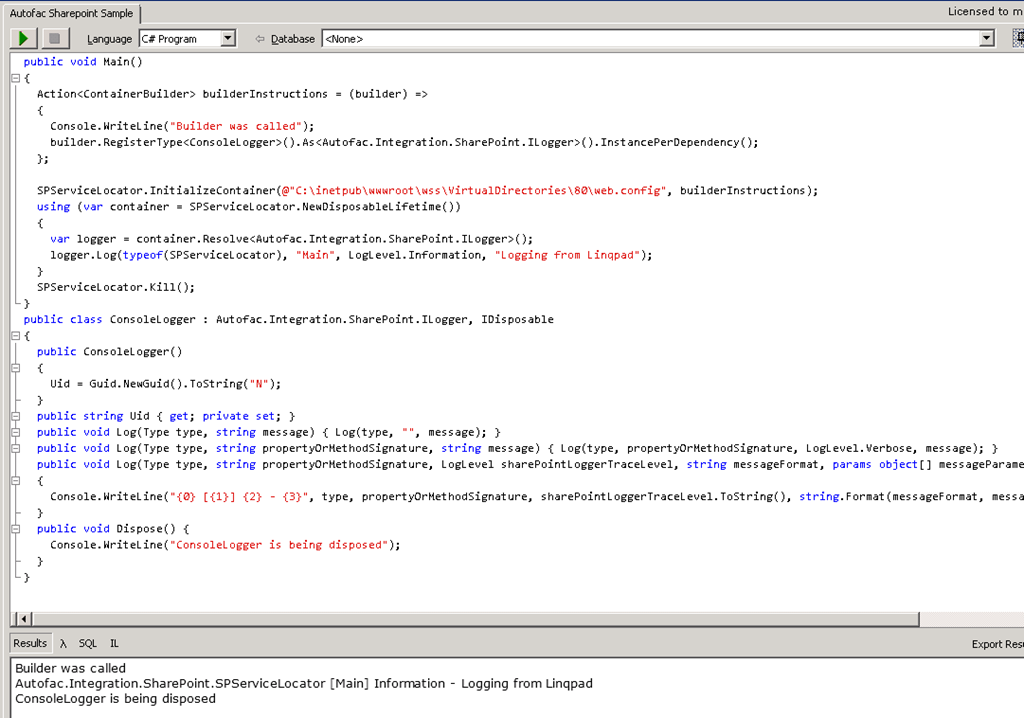
You can reference and override the registrations from a console app, powershell, and/or Linqpad, and as long as you are on the server, access service implementations.
General Comments
If you’re interested in this code, go ahead and download the sample attached to this post. I’ve included the feature and feature event receiver project, and a library project which has SPContainerBuilder, SPServiceLocator, SPContainerProvider classes and more that help with managing Autofac capabilities.
BTW: I coded all this in 1 day, as a prototype, so I can’t promise it’s 100% full-proof, but it does work in my use-cases. Do download the code and play with it, and if you decide to improve this, let me know. Or take it into a new direction all-together, that’s fine too  .
.
Thanks for reading as always.
Comments
Comments are moderated. Your email is never displayed publicly.